
Activity Today and assessment rounds
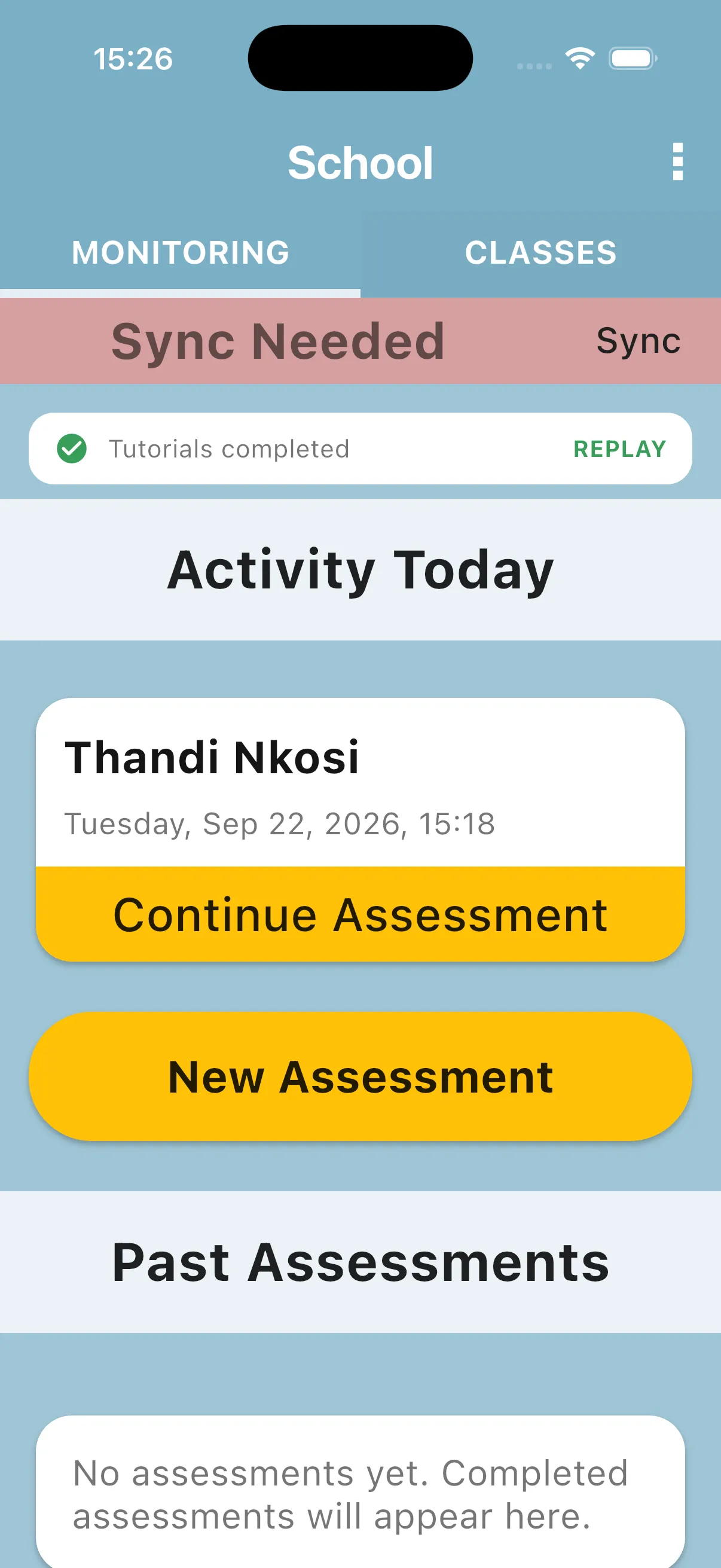
The school home screen has a section called Activity Today that lists today’s internal evaluations that have been started but not yet completed. From here you can pick them up again with one tap.
1. Find the Activity Today section
Section titled “1. Find the Activity Today section”Open the school home (the MONITORING tab). Below the sync card you will see a banner that reads Activity Today. Each entry shows the evaluated teacher’s name and the date the evaluation was started.
2. Tap an entry to continue
Section titled “2. Tap an entry to continue”Tap any card under Activity Today to open that evaluation’s home. Continue from the pupil roster, or the TEACHER tab when teacher questions are assigned. Your progress is exactly where you left it, because answers save automatically as you go.
3. Complete to clear the entry
Section titled “3. Complete to clear the entry”Once you finish the evaluation and tap the yellow Complete Assessment bar, the entry moves out of Activity Today and into the Past Assessments section lower down.
4. Sync to share progress
Section titled “4. Sync to share progress”Sync from time to time so your in-progress work is also stored on the server. Only successfully synced work is available from the server on another device. Before changing devices, wait for a successful sync.
Next: Past evaluations
An unfinished round from an earlier day appears under Past Assessments, so check there if it is no longer in Activity Today.