
Email sends
Invitations and tutorial reminders that go to many teachers at once are not sent the moment you confirm. They are queued, and Email sends is the list of every one of them, across the whole organisation. It is in Settings, for senior managers and administrators.
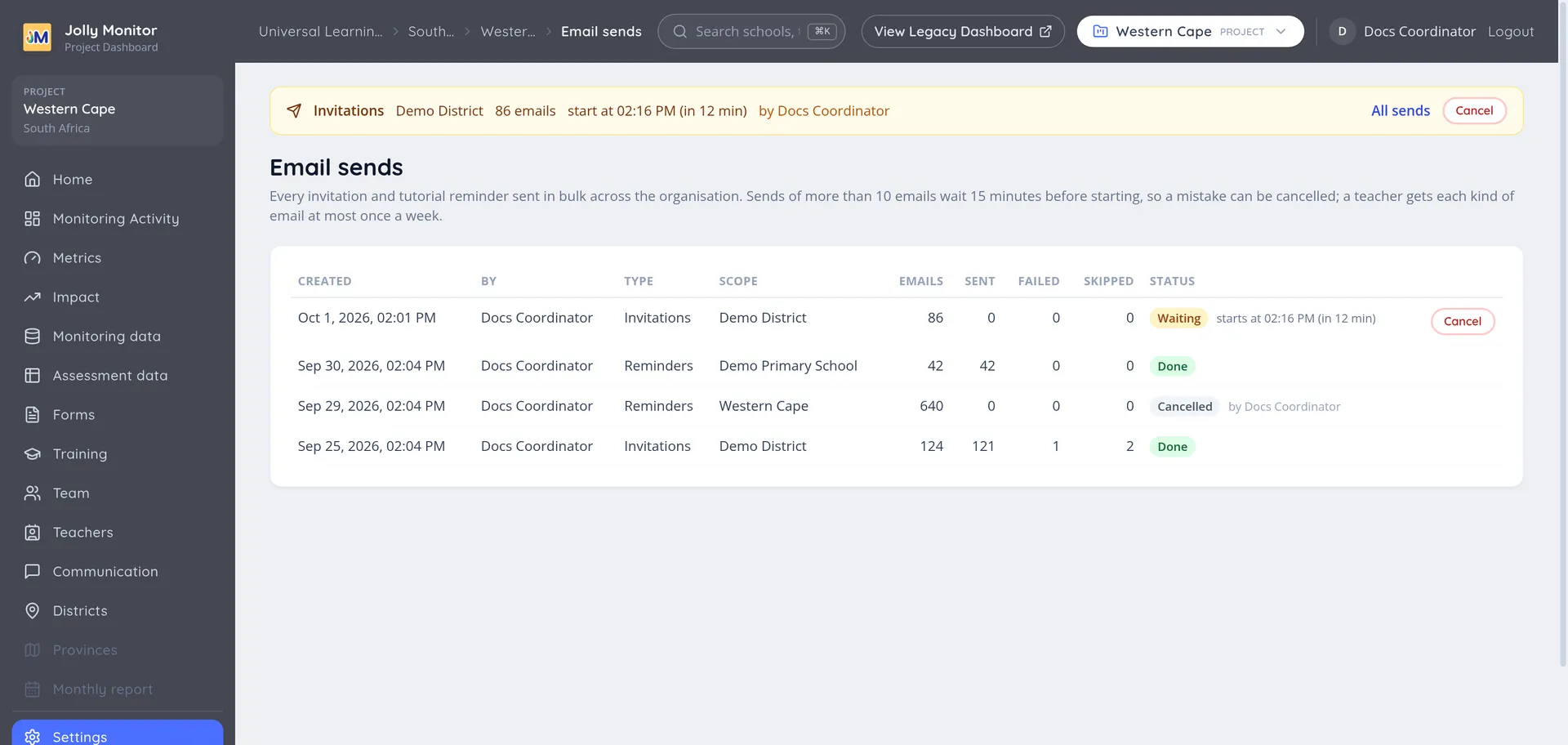
The list
Section titled “The list”| Column | What it shows |
|---|---|
| Created | When the send was confirmed |
| By | Who confirmed it |
| Type | Invitations or Reminders |
| Scope | The project, district or school it was sent to; a send made from the Teachers list shows the project, country or organisation the list was opened in |
| Emails | How many teachers it was meant for |
| Sent, Failed, Skipped | What happened to them |
| Status | Where the send stands |
The status is one of these:
| Status | Meaning |
|---|---|
| Waiting | Confirmed, not started yet; the time it starts is shown next to it |
| Sending | The emails are going out |
| Done | Finished |
| Cancelled | Cancelled before it started, with the name of who cancelled it |
| Stopped | Stopped part of the way through; the emails already sent stay sent |
Skipped counts teachers who were left out at the moment their email was due, because something changed while the send waited: they chose their password, finished the tutorials, lost their email address or were removed, or they had already received the same email in the last 7 days.
Cancelling a send
Section titled “Cancelling a send”A send to more than 10 teachers waits 15 minutes before it starts. During that time, and while it is running, it can be called off:
- Cancel, on a send that is Waiting: no email is sent.
- Stop, on a send that is Sending: the rest are not sent. The ones that already went out cannot be taken back.
A send that is waiting or running is also shown in a notice at the top of every page, with the same button and an All sends link to this list, so a mistake can be undone from wherever you are.
The limits
Section titled “The limits”These apply to every invitation and reminder, whoever sends it and from wherever:
| Limit | What happens |
|---|---|
| Up to 10 emails | They go out straight away |
| More than 10 | The send waits 15 minutes and can be cancelled |
| More than 100 | You are asked to type the number of emails to confirm |
| More than 500 | Only an administrator can send it |
| Once a week | A teacher receives each kind of email at most once in 7 days |
| A daily total | An organisation can send a set number of these emails per day; beyond it, the summary asks you to try again tomorrow |
Invitations are sent from Teachers and invitations, and reminders from Tutorial completion.
Next: Monitoring forms